Try yourself: Get the AfterCheck extension at www.aftercheck.ai.
The Story Behind AfterCheck
AfterCheck didn't start as a fact-checking product — it started as an LLM rating system.
A friend and I had just built a product focused on pricing security vulnerabilities — an app that rates security vulnerabilities in order to derives price estimates for bug bounty programs. Coming off that work, we riffed on a new idea that bubbled up to a rating system for LLM responses across dimensions like security, bias, ethics, safety, and trust.
It was the beginning of 2025, and I had just began my year of entrepreneurship. We were both early users of LLMs and encountered the same issues many others were experiencing — hallucinations, factual inaccuracies, biased framing, ethical concerns, and safety-related problems. To be fair, the technology was still in its infancy and evolving rapidly. But at the same time, adoption of products were growing exponentially, which made these issues feel more urgent and worth deeper exploration.
Classic me, I built a prototype in about a week — and it was terrible.
Not because it didn't work, but because the output was fundamentally unhelpful. The prototype rated each LLM response across bias, ethics, safety, and trust, producing numerical scores for users to interpret. The prototype delivered on the requirements, but in reality, the scores were too abstract for the general user to derive any meaningful value from it.
Not all was lost.
We had a tangible prototype and an idea that still felt directionally correct — we just needed to refine our understanding of the problem. In classic product management fashion, we started observing how people were using LLMs and focused on nuances where the LLM output triggered some form of skepticism and more importantly, what they naturally did as a result. Patterns emerged, which we further confirmed through broader and more focused surveys. People largely cared about one thing: factuality.
People were not really worried about whether a response was biased or unsafe — they were struggling to tell whether elements within it were correct. At the time, LLM outputs often sounded confident while containing incorrect, outdated, or unsupported claims. As a result, identifying these issues required constant skepticism and a tendency toward excessive, manual, and time-consuming verification.
I was already familiar with solutions attempting to address these problems. On the one hand, LLM providers were building in safety, trust, and security mechanisms directly into their platforms — but largely focused on preventing harmful or unsafe outputs at the point where generation happens.
On the other hand, a wave of third-party tools were also emerging. These tools were often simple web-apps with interfaces for users to copy and paste LLM responses into. Many focused on detecting whether content was human versus AI-generated, while others specialized in deepfake detection. I was not aware of any products tackling the factuality problem head on, which seemed like a blue ocean opportunity.
All of this led us to the following question:
Could we build an easy-to-use product that fact-checks LLM responses quickly and reliably — directly inside the tools people already use?
The outcome of this question became AfterCheck.
Product Overview
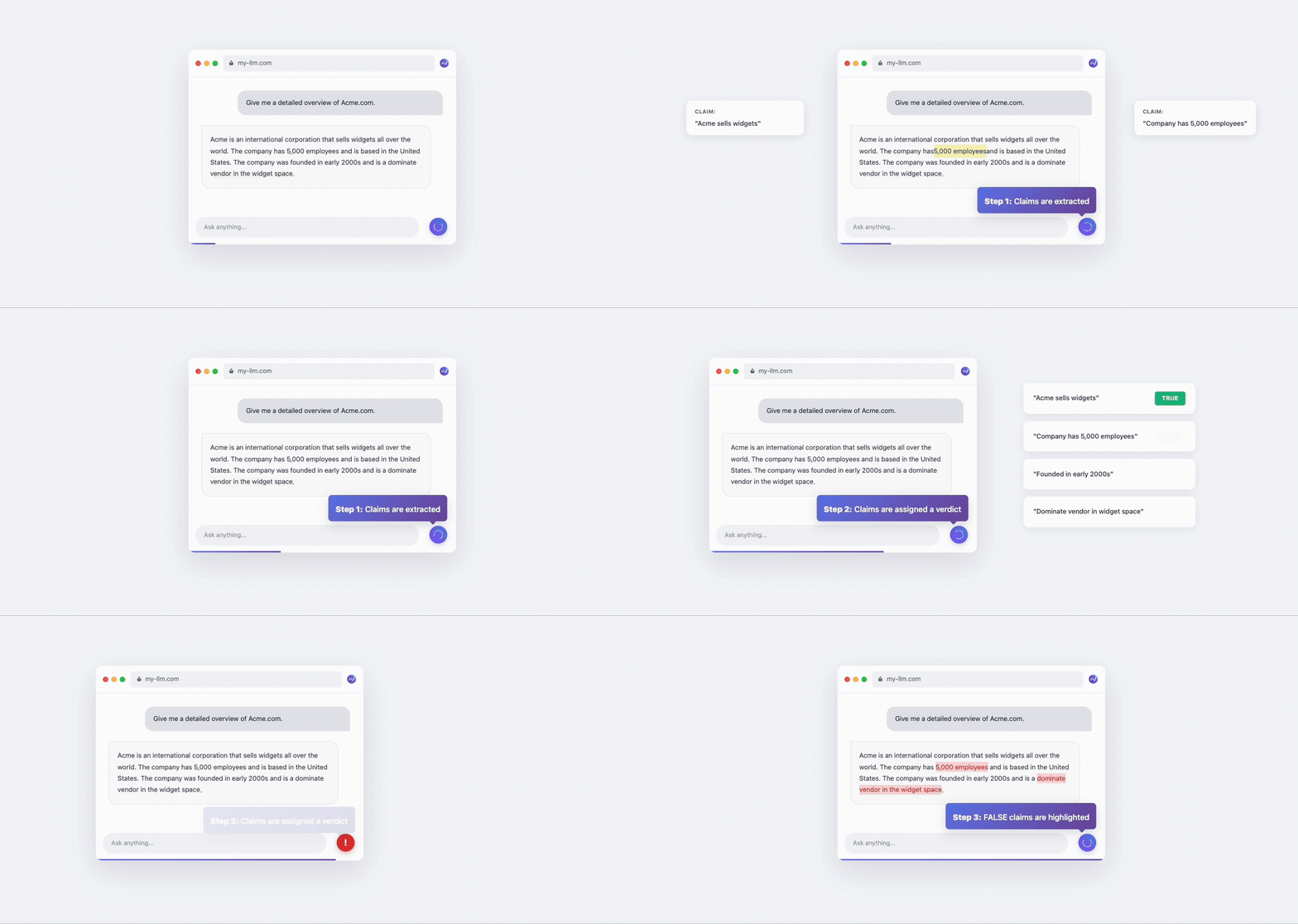
AfterCheck is a Chromium-based browser extension that automatically reveals misinformation in ChatGPT, Claude and Perplexity responses. The extension monitors for conversations between the user and the underlying language model so it can capture both the user's question and the model's response.
When a response is captured, the extension sends the question–response pair for fact-checking, then automatically highlights inaccurate claims directly on the original LLM response. Users can hover over a highlighted claim to see additional context — including a correction, supporting evidence, and a confidence score explaining why the claim was flagged.

How did we ultimately come up with this solution design?
From Rating To Factuality
AfterCheck started with a little bit of wondering.
Our initial idea was a rating system that would score individual LLM responses across bias, ethics, safety, and trust. At the time, model rating systems were increasingly common, but most focused on model performance rather than response quality. Meanwhile, like many users, we were experiencing hallucinations, factual inaccuracies and related on a daily basis. We weren’t interested in building another leaderboard. We wanted to explore whether these trust-related concerns could be measured and surfaced in a more tangible, response-level way.
At the same time, we converged on a browser extension as solution design. Many of the existing tools required the user to copy and paste LLM output into a separate website for analysis, breaking flow and adding friction. But people already interacted with LLMs inside tools like ChatGPT, Claude, and Perplexity. A browser extension allowed us to easily capture the question and response directly, analyze it in context, and surface insights without forcing users to change how they worked.
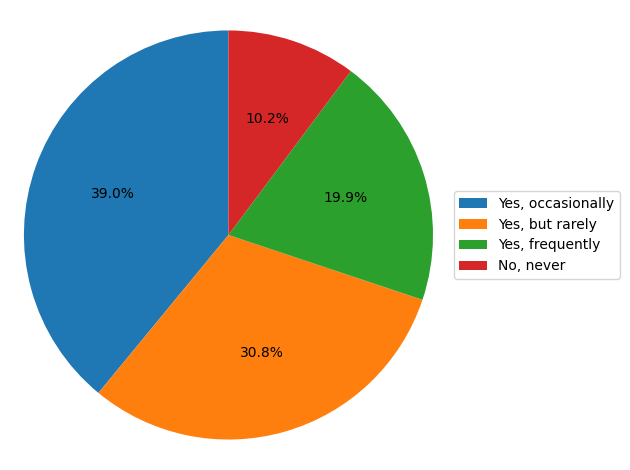
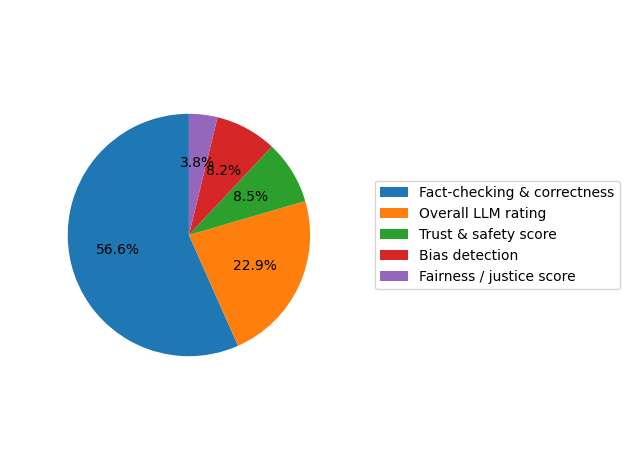
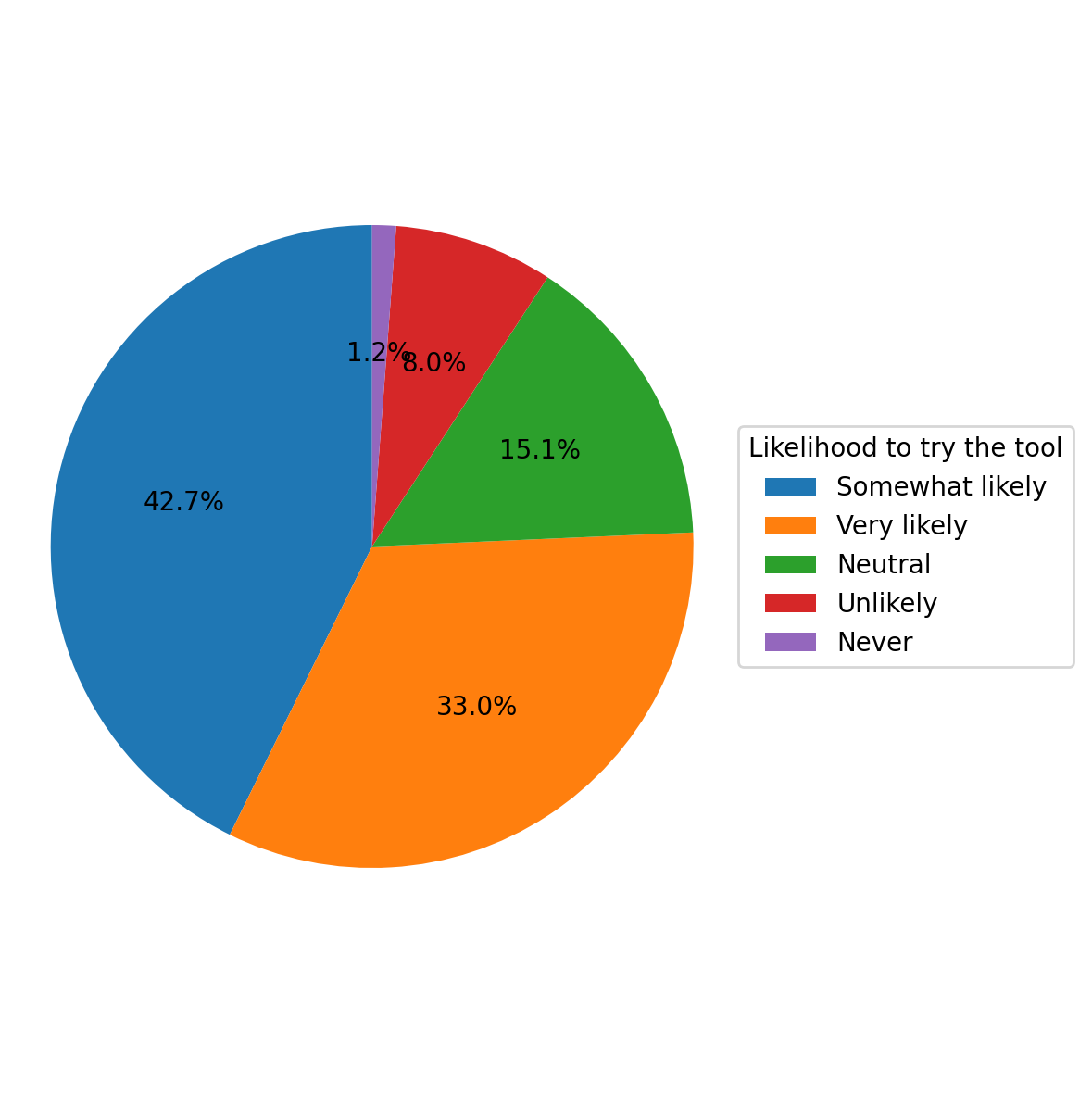
As we began using early prototypes ourselves and sharing them with others, we started to pivot. While users appreciated the broader idea of trust, what they really cared about was factuality. We took a data driven approach, running multiple surveys to confirm our understanding of the problem and how we were thinking about solving it. Below are results from a few of our survey questions:
Question: How frequently do you notice hallucinations or factual inaccuracies in LLM responses?
Question: What features would you find most valuable in a tool designed to address these issues?
Question: If this tool was available as a browser extension, would you try it?
What started as an LLM rating system was refined through prototyping and user feedback into a browser extension that singularly helps users fact-check individual LLM responses for factuality.
Architecture
AfterCheck consists of two main components:
(1) a Chromium-based browser extension, and
(2) a proprietary fact-checking pipeline.
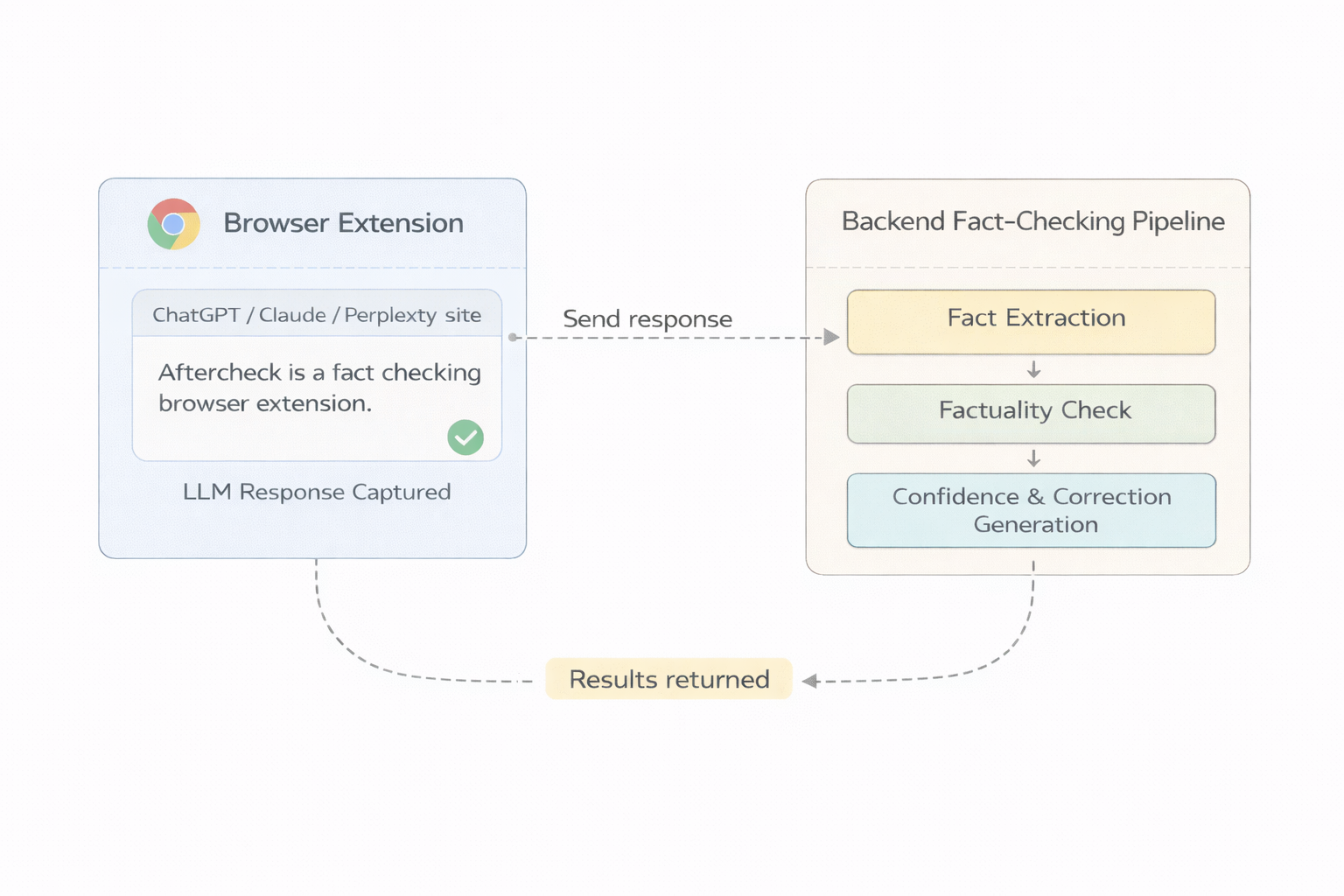
These components work together to verify the factual accuracy of large language model responses in near real time, directly within the user's existing workflow.
The browser extension is responsible for everything that happens inside the user's environment. It detects when a user is interacting with ChatGPT, Claude, or Perplexity, captures the relevant question and response, and manages all client-side behavior — from state tracking and response detection to rendering highlights and hover-over tooltips.
Once a question–response pair is captured, it is sent to a backend fact-checking pipeline. At a high level, the backend first extracts claims from the response, provides a true / false verdict for each claim in the context of the original question, then returns the results back to the extension.
The extension parses the results, then generates a map of the original response so that inaccurate claims can be highlighted. Highlighted claims include hover-over tooltips that provide additional context such as corrections, confidence levels, and evidence — all without requiring the user to leave their conversation.
Lets dig a little deeper into how all of this works.
Detecting and Capturing Conversations
The first step in the AfterCheck journey is detecting when a user initiates a conversation with an LLM, knowing when the LLM has finished responding to that question, then precisely capturing the question-response pair for fact checking.
At a high level, there are several established techniques for detecting activity in web applications — each with its own tradeoffs. Options range from monitoring DOM mutations, polling for state changes, or relying on event-based hooks tied to user actions or application lifecycles. Any of these could, in theory, be used to detect when a conversation is happening, determine when a response is complete, and help me capture the resulting content. In practice, each approach differs significantly in signal quality and performance overhead.
AfterCheck builds on these techniques to reliably interoperate within ChatGPT, Claude, and Perplexity. The extension combines platform-specific signals and heuristics to identify active conversations and determine when responses are complete.
Understanding the DOM
At the user level, ChatGPT, Claude, and Perplexity have simple, conversation-focused interfaces with a single input box for interacting with the underlying LLM. Under the hood, their DOM structures are moderately complex — and differ in important ways that matter for AfterCheck.
The first challenge is detection: how do you reliably identify when a real conversation is actually happening with an LLM?
A natural assumption is you monitor the DOM and treat any mutation as signal of an in-progress conversation. This approach breaks down quickly because LLM interfaces are surprisingly noisy. Some interesting observations include page re-rendering or content re-generation due to LLMs updating their internal state. Analytics, telemetry, and general background UI components also contribute to noisy DOMs that give the illusion of activity when there is none.
Why does this matter? Because reliable detection is what makes inline fact-checking possible in the first place. AfterCheck needs to capture complete question–response pairs for the fact check pipeline to work effectively. The product also operates on a pay-per-fact-check model so pre-mature or partial captures is a requirement. Admittedly, even though strong detection and capture mechanisms are in place, the extension is vulnerable to DOM changes which have happened several times during my evelopment journey.
To solve this, the extension implements lightweight, site-specific DOM mutation observers that activate when the user is on a ChatGPT, Claude, or Perplexity site. Rather than responding to every DOM change, these observers look for specific, high-signal patterns — such as prompt submission events, response streaming behavior, and indicators that a conversation is actively progressing. Only when those signals execute in a specific sequence does the extension proceed with capture.
The second challenge is capture: how do you precisely capture both the user's question and corresponding LLM response.
To break this down, I studied a vast number of response structures produced across LLM platforms and the underlying DOM representations behind them. The goal was to identify reliable patterns that would allow us to extract content consistently while preserving enough structure for downstream processing.
Here are the high level patterns:
- Short, dense paragraphs
- Long-form explanatory text
- Lists or nested bullet points
- Tables with multiple rows and columns
- Code blocks
- Inline formatting, emojis, images, citations, or other enhancing elements
Capturing complete responses requires more than just extracting text. In additional to preserving the structure, we also needto normalize content for the fact-checking pipeline — parsing out elements like emojis, images, and code blocks — while still preserving the original structure of the response so inaccurate claims can later be highlighted in the correct location.
This ultimately led to the development of site-specific selectors and parsing mechanisms for each platform, allowing the extension to reliably detect conversations, capture responses, normalize content for fact-checking, and preserve enough structural context for accurate highlighting.
Determining When a Response Is Complete
Once a conversation is detected, another critical challenge was determining when an LLM response is actually complete. While this was relatively straightforward on some platforms, it proved far more difficult on others.
If you pay close attention to how LLMs render responses, you'll notice completion indicators — UI elements such as copy, refresh, share, or feedback buttons. These indicators typically appear only after a response has fully finished generating, making them a reliable indicators on when a response is complete.
In many cases, these indicators worked well as anchors for completion detection. However, one random day, I encountered pre-mature captures on one of the platforms and could not understand why. When visually observing an in-progress response, I did not see any completion indicators, yet logs told me otherwise.
It turned out that on one of the platforms, completion indicators are injected into the DOM alongside the response but remain invisible until generation finishes. From a DOM perspective, the elements were present, but from a UI perspective, they hadn't yet transitioned into view.
To address this, the extension combines completion indicators with additional signals, such as visibility checks and timing heuristics, to reliably determine when a response has truly finished. While standard indicators like copy and share buttons are sufficient on some platforms, others required more creative solutions to avoid premature capture.
Preventing Duplicate Captures
Another major challenge was ensuring that the same LLM response is never fact-checked twice.
Users scroll through conversations, refresh pages, switch tabs, and revisit prior responses frequently. Without safeguards, the extension could easily re-capture and re-process content that has already been fact-checked — leading not only to redundant backend processing, but also to unnecessary consumption of fact-check credits (AfterCheck monetizes with a pay-per-fact check payment model).
To prevent this, the extension implements a deduplication mechanism based on hash comparisons. Before initiating a fact check, the extension computes a hash of the full question–response pair and compares it against hashes of responses already processed in local storage. If a matching hash is found, the capture is skipped as the core design.
We experimented with hashing partial content — i.e. hashing only the first or last few sentences of a response — but found this approach unreliable. Many LLM responses share similar openings or conclusions, which led to collisions and false positives. Given the relatively short length of each response, computing hashes on full responses was far more reliable without significant overhead.
This deduplication mechanism also enabled reliability across page refreshes and tab switches. Even if the DOM is reloaded or the user navigates away and returns, the extension recognizes responses it has already processed so it can avoid redundant fact checks.
One edge case we are actively working on involves long-running or historical conversations. Currently, if a user opens a lengthy conversation that has not been fact-checked before, the extension may begin fact-checking the entire visible conversation. To improve this experience, I'm adding more functionality that detect these longer spans of existing content and give the user a choice on what they want to fact check and what they want to skip.
Tab Switching and Page Refreshes
Modern browsers introduce additional complexity when users switch tabs or refresh pages. Background tabs may throttle JavaScript execution, delay DOM updates, or pause observers altogether.
The extension is designed to continue tracking DOM mutations even when the user navigates away mid-response. This ensures that responses are still captured and fact-checked correctly once generation completes — even if it happens in the background.
Our existing deduplication logic was also helpful in ensuring page refreshes did not trigger redundant fact checks for content that had already been processed.
User Feedback and Controls
Once a response is detected and queued for fact-checking, the extension implements several visual mechanisms as well controls that inform the user what is happening:
- A toggle with multiple visual queues include progress rings and status indicators
- An ability to cancel in-progress fact checks via holding the toggle for 3 seconds
- Toggles to globally disable fact-checking or auto-highlighting
These controls ensure the extension feels assistive rather than intrusive, while still operating automatically by default.
The Fact-Checking Pipeline
Once the extension captures a complete question–response pair, it sends that data to the fact-checking pipeline. While the inner workings of this pipeline are proprietary, the high-level flow can be summarized in three steps:
- Claim Extraction - LLM responses are broken down into individual claims. Each claim is treated as a discrete factual assertion rather than as part of a single block of text, since a single response may contain a mix of correct, incorrect, or ambiguous statements.
- Factuality Evaluation - Each claim is evaluated for factual accuracy using a proprietary fact-checking pipeline. Claims are assessed in the context of the question, allowing for more nuanced judgments than evaluating statements in isolation.
- Verdict Generation - A true or false verdict is assigned to each claim based on scoring mechanism. Claims that fall below a threshold are flagged as inaccurate while others are noted as accurate.
The resulting data is packaged into a structured format and returned to the browser extension. From there, the extension maps these results back onto the original LLM response, highlighting inaccurate claims and surfacing additional context through hover-over tooltips.
Highlighting Inaccurate Claims
Once the extension receives results from the backend fact-checking pipeline, it moves into one of the most visible — and technically challenging — stages of the system: highlighting inaccurate claims back in the original LLM response.
From the user's perspective, the goal is simple. Inaccurate claims should be clearly highlighted, and hovering over a highlighted span should surface additional context — including a correction, a confidence score, and supporting evidence. Achieving this reliably across different platforms and response structures was another engineering challenge.
A Multi-Stage Highlighting Algorithm
Once results are returned from the fact-checking pipeline, the extension must determine where — and how — to highlight inaccurate claims in the original response. This turned into a significant engineering challenge for a number of reasons.
At a high level, claims can vary widely in how closely they resemble the original text. In some cases, a claim maps directly back to a contiguous span of text. In others, the relationship is far more indirect — spread across multiple sentences, paraphrased, or implied through context rather than explicitly stated.
Because of this variability, the system relies on a multi-stage highlighting algorithm rather than a single matching strategy.
The first stage attempts an exact phrase match. If an extracted claim corresponds directly to a verbatim span in the LLM response, the extension can confidently highlight that span. This is the simplest and most precise case, and when it works, it produces clean and intuitive highlights.
However, exact matches are often the exception rather than the rule.
LLMs frequently paraphrase information, restructure sentences, or distribute claims across multiple parts of a response. A single factual assertion may be expressed using different wording, split across sentences, or implied through surrounding context. In these cases, an exact phrase match fails.
When that happens, the algorithm progresses to additional stages that use fuzzy matching and related alignment techniques to infer where the claim most likely originated. These stages reason about similarity rather than identity, allowing the extension to locate the best candidate region of text even when wording differs.
The goal of the multi-stage approach is not to find any match, but to find the most semantically appropriate place to apply a highlight — minimizing false positives while ensuring that genuinely problematic claims are surfaced.
To make this possible, the algorithm needs a structured way to reason about text boundaries and meaning. This is where the concept of atomic blocks becomes foundational.
Atomic Blocks: Defining Meaningful Highlight Boundaries
Rather than operating on raw character offsets or arbitrary DOM nodes, the extension works with atomic blocks — discrete, meaningful units of content such as sentences, list items, or table cells.
Atomic blocks provide a semantic layer between the extracted claims and the raw DOM. They ensure that highlights are applied to coherent units of meaning rather than fragmented or misleading spans of text.
For example, a claim like "AfterCheck is a browser extension" should map cleanly to a single sentence or list item — not be split across formatting boundaries or DOM elements. Atomic blocks make it possible to reason about text in a way that aligns with how humans read and interpret content.
Once claims are matched against atomic blocks, the extension can apply highlights confidently, even when claims are paraphrased or distributed across complex response structures.
Filtering Non-Fact-Checkable Content
Before claims can be matched and highlighted, the extension must first determine what not to consider.
Not all content in an LLM response is suitable for fact-checking. Some elements are inherently non-factual, ambiguous, or outside the scope of what a factuality system can reasonably evaluate. To avoid misleading or confusing highlights, the extension explicitly filters out several categories of content during capture and highlighting.
These include:
- Code blocks, where correctness depends on execution context or intent
- Generated images or videos, which cannot be fact-checked as textual claims
- Purely decorative or UI elements, such as icons or interface controls
By excluding these elements early, the system narrows its focus to text-based factual assertions — the type of content where fact-checking is both meaningful and actionable. This filtering also simplifies downstream processing by reducing noise and ambiguity during claim extraction and highlighting.
Accounting for Platform-Specific Structure
Even after content has been normalized into atomic blocks, structural differences across platforms still matter.
Each supported LLM interface presents content differently, and responses often blend multiple structures within a single answer. A claim may appear as a list item, a table cell, or several sentences deep inside a dense paragraph. In some cases, the subject of a claim is introduced early, while the factual assertion appears much later and relies on implicit references.
The highlighting algorithm must account for these structural nuances when mapping claims back to text. This requires awareness of how atomic blocks relate to one another within the broader response — for example, understanding that multiple sentences belong to the same conceptual paragraph, or that a table row represents a distinct factual unit.
By preserving enough structural context from the original DOM, the extension can accurately place highlights in a way that feels intuitive to users, even when responses are complex or deeply nested.
Adapting to Constant UI Changes
One final challenge is that none of these platforms are static.
The DOM structures of ChatGPT, Claude, and Perplexity evolve over time as each product iterates on its interface. New layouts are introduced, existing elements change, and response structures shift. A highlighting strategy that works perfectly today may break tomorrow if it relies too heavily on brittle assumptions.
To remain resilient, the extension is designed to tolerate ongoing UI changes. Site-specific selectors and parsing logic are continuously updated as interfaces evolve, and the highlighting pipeline is built to fail gracefully rather than produce incorrect or misleading highlights.
When a new LLM response is detected, any highlights from a previous response are cleared and the latest results are applied fresh. This ensures users always see highlights that correspond to the most recent interaction, even as the underlying UI changes.
Closing the Loop for the User
When all of these pieces come together, the experience feels intentionally simple.
Inaccurate or questionable claims are highlighted directly in the LLM response. Hovering over a highlighted span reveals the correction, confidence score, and supporting evidence — all inline, contextual, and without leaving the page.
Despite the complexity behind the scenes — from DOM mutation detection to atomic blocks to multi-stage matching — the outcome is minimal by design: a clear, intuitive way for users to see what may be wrong in an LLM response and understand why.
Learnings Along the Way
It's been an amazing journey evolving AfterCheck into what it is today — and even more rewarding to see how people are using it and deriving value from it every day.
What started as an internal experiment quickly became a learning process shaped by real users. Early on, a small group of friends and family helped us iterate on the experience, pressure-test the value, and challenge our assumptions. As the product matured, we expanded feedback through broader surveys and controlled beta testing. Over time, interest began to grow organically — people weren't just curious to test AfterCheck, they wanted to use it as part of their actual workflow.
One pattern became clear very quickly: people who rely on LLM outputs for real work cared deeply about factuality — but only if verification was effortless.
Researchers and academic users were among the first to adopt AfterCheck in meaningful ways. Many already used LLMs for exploratory research, synthesis, or background understanding, but struggled to confidently separate sound claims from subtle inaccuracies. Inline highlights helped them quickly identify which parts of a response deserved closer scrutiny, making LLMs more useful as research aids — not because the models became perfect, but because uncertainty became visible.
We saw similar behavior from lawyers and other knowledge-intensive professionals. When reviewing LLM-generated summaries of cases, laws, or principles, small inaccuracies or outdated references can matter a great deal. AfterCheck didn't replace expertise, but it helped surface where deeper verification was needed — especially in nuanced or high-stakes scenarios.
Across all of these use cases, one lesson stood out: inline matters.
Tools that required users to leave ChatGPT, Claude, or Perplexity — even when they offered similar functionality — struggled to see sustained adoption. Copying and pasting responses into separate websites added friction and broke focus. AfterCheck worked differently because it stayed in context. By surfacing factual signals directly on the response itself, verification became a natural extension of the interaction rather than an extra step. Many users described the highlights as a kind of "heat map" — an immediate visual cue for where attention was needed.
Closing Thoughts
Wow, what a fun project and product that I personally use everyday. What started as an LLM rating system turned into a product that helps me and many others fact check LLM responses on a daily basis.
There's still a lot of work ahead. Improving accuracy, reliability, and scalability is an ongoing process. But one lesson has remained consistent throughout this journey - factuality is paramount, and as LLMs become increasingly relied upon, so does the importance of tools that help ensure their outputs can be trusted.
To all our early supporters, mentors and customers - thank you from the bottom of my heart. I really appreciate your trust and feedback as we developed AfterCheck into the product it is today.
If your interested in trying AfterCheck, please sign-up on our website (www.aftercheck.ai) - we are invite only so we can keep a close eye on quality and infrastructure costs in the short term.
Fun fact - it took ~10,000 questions across ChatGPT, Claude and Perplexity to build AfterCheck into the product it is today :)