
Password Vault Internals
Over the past two decades, the number of online accounts a person manages has grown from a handful to hundreds. The natural human response to that scale — reusing passwords, choosing predictable ones, writing them in notes apps — has produced a predictable outcome: credential breaches are now one of the most common initial access vectors in enterprise intrusions. A password vault solves this not by asking users to behave better, but by removing the cognitive burden of security from the human entirely. It generates strong, unique credentials for every account, stores them encrypted, and fills them in automatically. The user remembers one thing: the master password.
This article examines how that system works beneath the surface. Starting with the high-level architecture, it covers the browser extension as the primary client, the cryptographic primitives that make zero-knowledge encryption work in practice, the backend storage and sync model, mobile and native clients, enterprise and secrets management deployments, account recovery mechanisms, and the threat model — what a vault protects against and where the limits are. The goal is a complete technical picture of what a password vault actually is, not as a product, but as a security system.
Password Vault Architecture
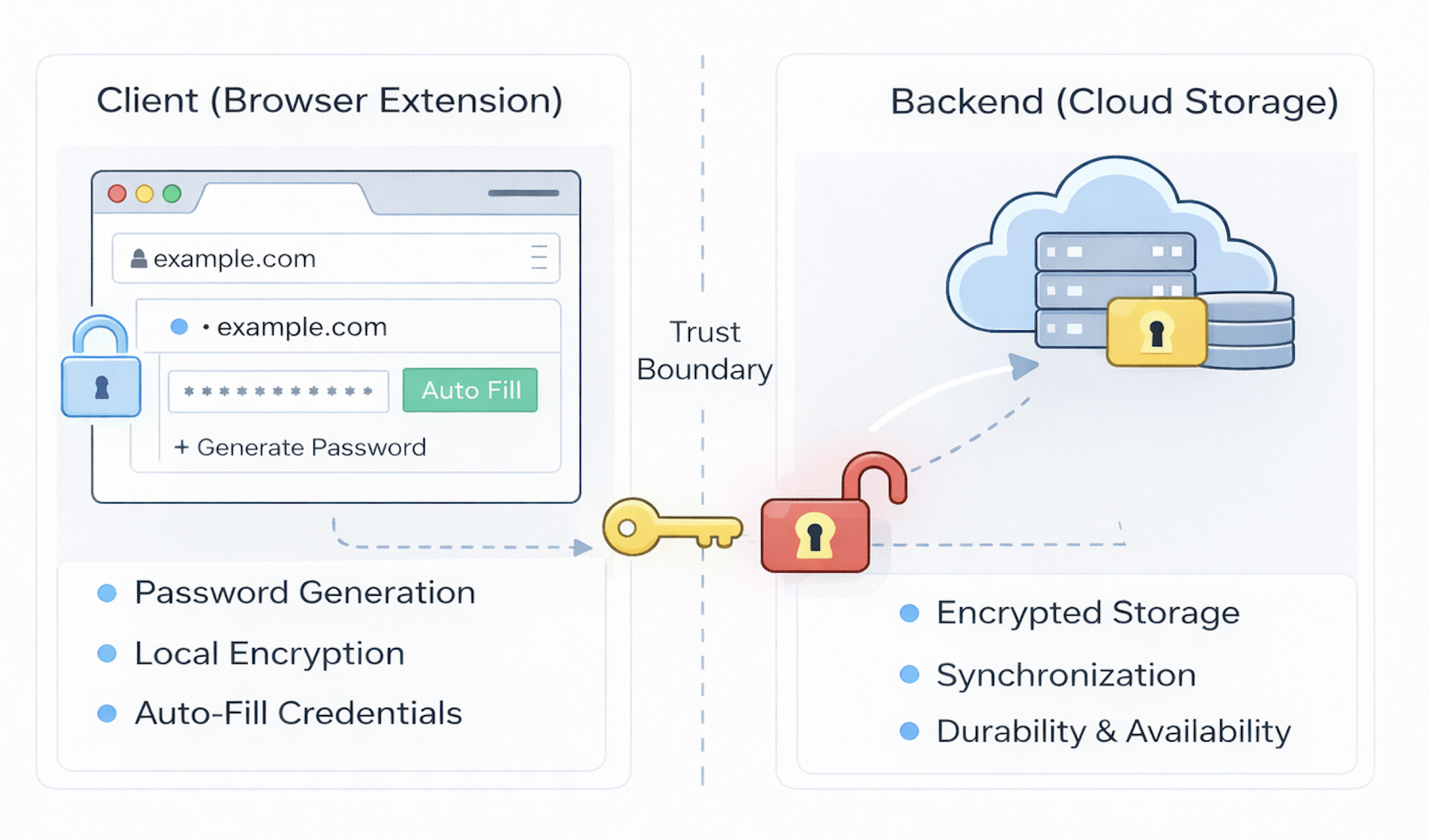
At its core, a password vault is a small, distributed identity system whose job is to manage secrets safely across devices, contexts, and time. When you strip away vendor branding and marketed features, most modern vaults share a common architectural pattern built around a clear division of responsibility between a local client and a remote backend.
On one side sits the client — most commonly a browser extension, but also native mobile apps and desktop applications. This is where the user interacts with the vault and where all security-sensitive operations occur. The client generates strong passwords, derives cryptographic keys from the master password, encrypts secrets before they leave the device, recognizes when the user is on a site with stored credentials, and safely auto-fills those credentials on demand. The client is the security brain of the system: it holds the keys, performs cryptographic operations, and decides how secrets are used in real time.
On the other side sits the backend service, which acts as a storage and synchronization layer. The backend does not need to understand the content of your passwords; in a well-designed system it never sees them in plaintext. Instead, it stores only encrypted data and makes that data available across devices so the vault follows you wherever you go. It is also responsible for durability and availability, ensuring that secrets are not lost if a single device fails.
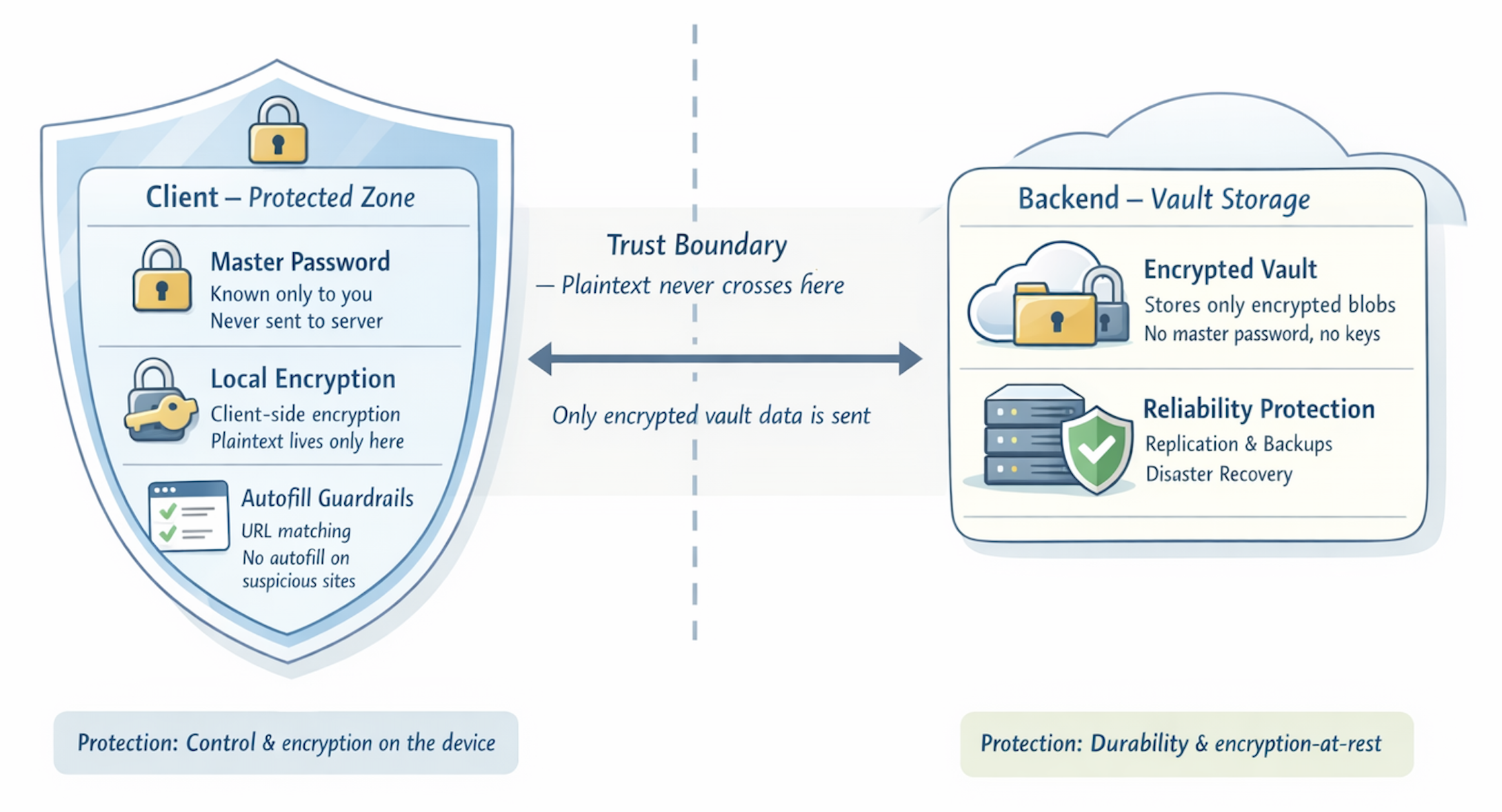
Separating these two sides is a crucial trust boundary. Everything sensitive — the master password, derived encryption keys, and plaintext credentials — exists only on the client. Everything on the server is encrypted in a way that only the client can decrypt. This separation enables cloud synchronization without surrendering privacy to the provider.
The architecture can be understood as two tightly coupled layers:
- Client (Browser Extension, Mobile App, Desktop): where passwords are generated, encrypted, managed, and used in real time.
- Backend (Cloud Storage): where only encrypted vault data is stored, synchronized, and preserved over time.
Together, these two layers replace scattered, insecure password habits with a single, well-protected vault. How the client achieves that protection — and what it actually means for security — depends on understanding the cryptographic machinery underneath.
The Browser Extension (Client)
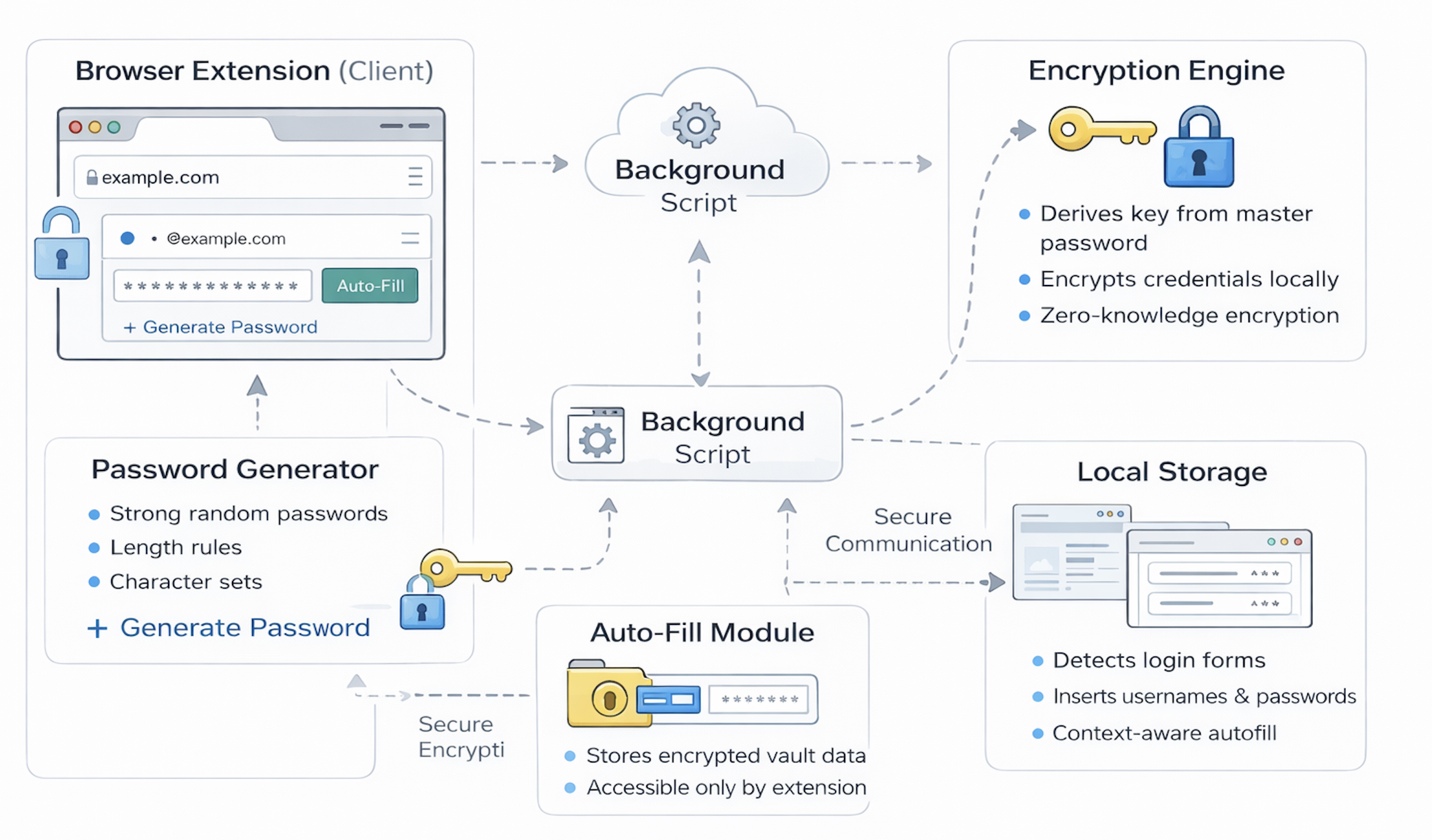
The browser extension is simultaneously the user interface and the security core of the vault. It is where secrets exist in plaintext, however briefly, and where the most important trust decisions are made. It is also the point in the system most exposed to the browser environment, including to malicious websites, extensions, and DOM manipulation.
What a browser extension can do
A browser extension operates with elevated access to the browser compared to ordinary web pages. It can:
- Read the current page’s URL and inspect its domain.
- Read and write to DOM elements, including login form fields.
- Store data locally on the device (extension local storage, IndexedDB).
- Communicate securely with a backend server via HTTPS.
- Display its own UI via popups, side panels, or inline overlays.
These capabilities make a browser extension the natural home for a password vault client. It can detect when you are on a site with saved credentials, generate a new password when you are creating an account, encrypt secrets locally, and fill login forms without requiring manual copy-paste.
Creating a vault account and the master password
The first interaction with the vault is creating an account and choosing a master password. This single step establishes the root of trust for the entire system.
The master password is the one secret the user must remember. It is never sent to the server. Instead, the extension uses it as the input to a key derivation function that produces the cryptographic key used to encrypt everything in the vault. From this point forward, the master password is never stored anywhere — not in the extension, not in the browser, not on disk. It exists only in memory for the duration it is needed to derive the key, and then it is discarded. All vault security ultimately rests on the confidentiality of this one input.
Creating and storing credentials
When saving credentials for a website, the extension captures:
- The website URL (or the domain extracted from it)
- The username or email address
- The password
- Metadata: creation timestamp, last-updated timestamp, optional notes
These fields are bundled as a vault entry. Before the entry leaves the device, it is encrypted using the key derived from the master password. The backend receives only an opaque encrypted blob. Even if the vault provider’s database is exfiltrated in a breach, the entries are unreadable without the master key, which never touched the server.
The password generation engine
Strong password generation is not just a convenience feature — it is the mechanism that breaks the credential reuse chain. A vault generates unique, random passwords for every account, so a breach at one site yields credentials that work nowhere else.
A well-implemented password generator uses a cryptographically secure pseudorandom number generator (CSPRNG) — in browsers, window.crypto.getRandomValues() — rather than Math.random() or time-seeded generators, which can be predicted. Typical configurable parameters include:
- Length (20–32 characters is common for generated passwords)
- Character set: uppercase, lowercase, digits, symbols
- Exclusion of visually ambiguous characters (
O,0,l,1) - Passphrase mode: wordlist-based phrases (4–6 words from a large dictionary) that are memorable but have high entropy
Client-side encryption and the zero-knowledge model
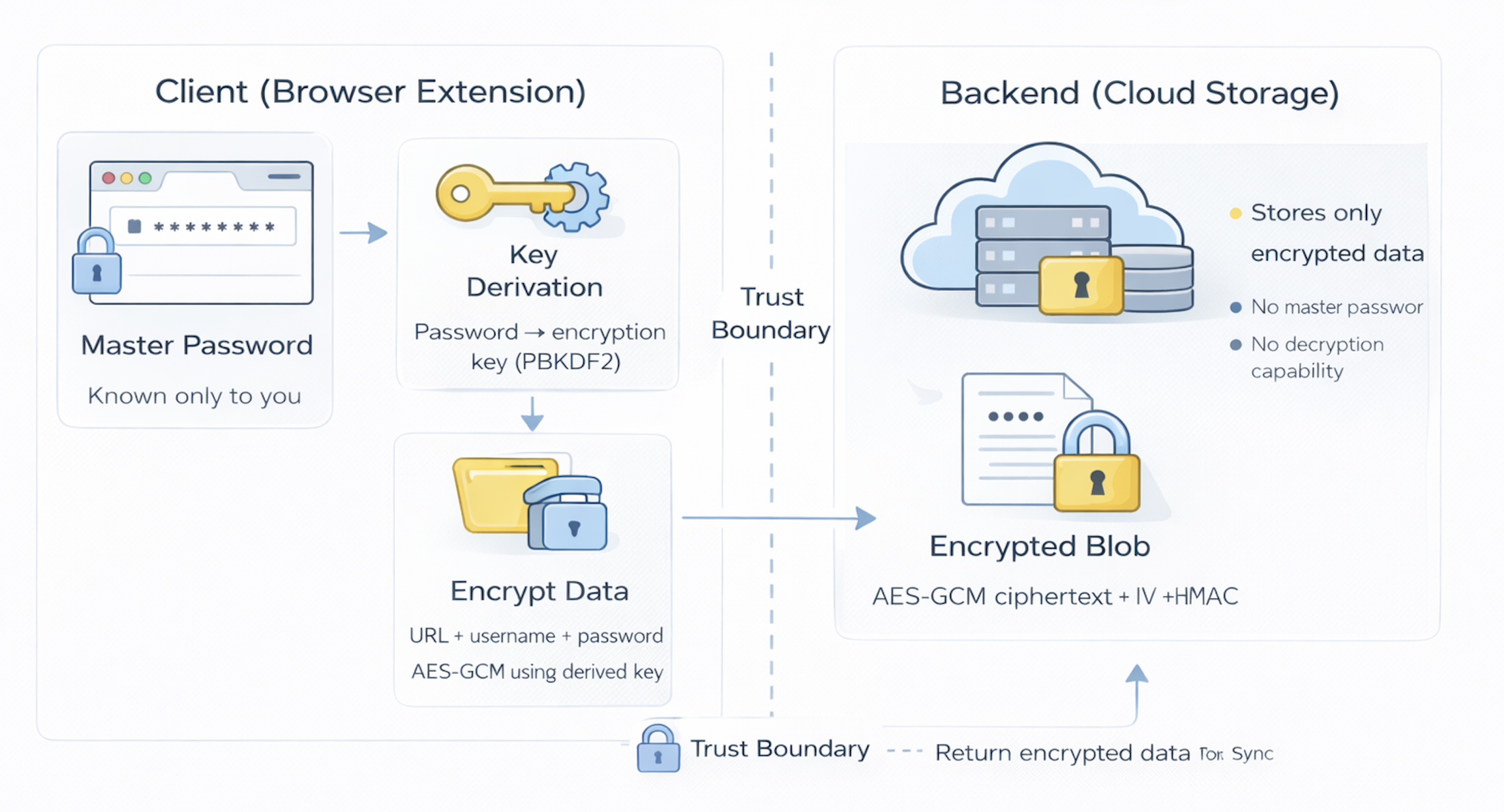
The defining property of a well-designed password vault is client-side encryption with a zero-knowledge model. Zero-knowledge in this context means the service provider has structurally zero knowledge of your plaintext secrets: they cannot see them, cannot decrypt them, and cannot be compelled to produce them in readable form even by a court order, because they genuinely do not possess the key.
In this model:
- The master password never leaves the device.
- All vault data is encrypted locally before being sent to the server.
- The backend stores only encrypted blobs, not readable passwords.
- The encryption key is derived from the master password and exists only on the client.
This has significant security consequences. A backend breach yields only ciphertext, not passwords. Insider threats at the provider cannot read vault contents. Legal requests produce only the encrypted data the server holds. The tradeoff is equally significant: there is no key escrow, no server-side recovery, no support ticket that can unlock your vault if the master password is lost.
Retrieving and decrypting secrets
When the user needs to access a credential, the process reverses. The extension requests the encrypted vault data from the backend. Once it arrives, the extension uses the locally derived key to decrypt the relevant entries in memory. Plaintext passwords exist in memory only temporarily — while the vault is unlocked and while they are actively being used. They are never written to disk or stored in the backend in readable form.
Auto-fill and origin binding
When the user navigates to a website, the extension checks whether stored credentials exist for that origin. If they do, the extension offers to fill the username and password fields. This matching is done against the registered URL or domain, not the page title or visual appearance of the site.
This URL matching is a meaningful anti-phishing control, not merely a UX convenience. When a user lands on a lookalike phishing site — paypa1.com instead of paypal.com — the extension finds no matching entry, because the domain does not match the one associated with the stored credential. It will not auto-fill, and the absence of the fill prompt is itself a signal that something may be wrong. This is similar in principle to WebAuthn’s origin binding for passkeys: the credential is cryptographically tied to a specific origin and will not work elsewhere. Password vaults implement a software equivalent through domain-scoped credential lookup.
The extension inserts credentials directly into the form’s DOM fields rather than using the clipboard. This avoids clipboard interception by malicious processes monitoring clipboard events. Some vaults also clear the clipboard after a configurable timeout as an additional safeguard when users opt to copy-paste manually.
Updating and rotating passwords
When a user changes a password on a website, the extension detects the change and prompts to update the stored entry. It may suggest generating a stronger replacement rather than a user-chosen one. Architecturally, this re-encrypts the vault entry and replaces it on the backend. Some vaults maintain a credential history, keeping N previous versions of a password so the user can recover a working credential if a password change fails or the new password is not accepted by the site.
Extension isolation and the Manifest V3 security model
Browser extensions operate within a structured permission model, but understanding it clarifies both the security properties they can provide and the attack surface they introduce. Extensions run in a separate browser process from web pages, with access to a defined set of browser APIs declared in their manifest. A vault extension injects a content script into pages that runs in the DOM context but in an isolated JavaScript environment: the content script can read and write form fields, but the page’s own scripts cannot access the vault extension’s memory or storage, and vice versa. Extensions are also isolated from each other at the process level — one extension cannot read another extension’s local storage, intercept its network requests, or inject into its pages.
Despite this isolation, extensions operate with access that exceeds what ordinary web pages have, in ways that matter for security. A vault extension with broad host permissions observes form fields across many origins simultaneously. Extensions update automatically through the browser extension store, creating a software supply chain dependency: a malicious update from a compromised developer account, a poisoned build dependency, or a store review process failure would take effect silently on all installed instances without user confirmation.
Chrome’s Manifest V3 extension standard, now required by Chrome and Edge, addresses some historical risks: persistent background pages are replaced by service workers that spin down when idle, reducing the attack surface of a long-running extension process in memory; remote code execution through externally loaded scripts is prohibited; and the host_permissions model is more granular and user-visible. MV3 does not eliminate the fundamental exposure that comes from running a security-critical application inside a shared browser process. A native desktop vault client runs in a more isolated operating system context with a smaller, better-defined attack surface — which is why some vendors recommend the desktop application for high-security deployments where the browser extension is optional rather than required.
Cryptographic Primitives
A password vault that says it uses “encryption” without specifying what it actually does with your master password is describing a black box. Understanding the cryptographic mechanics is what separates a system you can reason about from one you must take on faith. The chain from master password to encrypted vault entry involves three distinct stages: key derivation, key separation, and authenticated encryption.
Key derivation: turning a password into a key
A master password has two properties that make it unsuitable as a cryptographic key directly: it has variable length, and it has far less than 256 bits of true entropy even when strong. A key derivation function (KDF) converts the master password into a fixed-length cryptographic key while also making offline brute-force attacks expensive.
Two KDFs are commonly used:
PBKDF2 (Password-Based Key Derivation Function 2, RFC 2898) applies an underlying pseudo-random function — typically HMAC-SHA256 — to the password and a salt, iterating many thousands of times. Each iteration feeds the output of the previous iteration back as input. The salt (a random value stored alongside the encrypted vault, not secret) ensures that two users with the same password produce different derived keys, preventing precomputed rainbow table attacks. The iteration count controls work factor: more iterations mean each brute-force guess costs more time and CPU. NIST SP 800-132 recommended 600,000 iterations for PBKDF2-HMAC-SHA256 as of 2023. However, PBKDF2 is parallelizable on GPUs, meaning an attacker with GPU resources can test many password guesses simultaneously. Bitwarden uses PBKDF2 with 600,000 client-side iterations as its default, with optional Argon2id.
Argon2id (RFC 9106) is the winner of the Password Hashing Competition (2015) and is the recommended choice for new deployments. It is memory-hard: in addition to CPU work, it requires a configurable amount of RAM to compute. This makes large-scale GPU and ASIC attacks much more expensive, because modern GPUs have far less memory bandwidth per dollar than per-core compute. Argon2id has three parameters: time cost (iterations), memory cost (kilobytes of RAM required per computation), and parallelism (thread count). 1Password, Bitwarden (optional), and most modern vault implementations support or default to Argon2id. The recommended parameters from RFC 9106 for interactive authentication are at least 64 MB memory cost and 3 iterations.
The KDF takes as inputs:
- The master password (user-supplied)
- A salt (random bytes generated at account creation, stored on the server alongside the encrypted vault)
- Work factor parameters (iterations, memory cost)
And produces a fixed-length master key (typically 256 bits). This master key is never stored anywhere and is re-derived from the master password each time the vault is unlocked.
The 1Password secret key model
1Password adds an additional layer to this derivation model: the secret key. At account creation, 1Password generates a 128-bit random secret key and combines it with the master password before applying the KDF. The secret key is stored in the user’s Emergency Kit (a printable PDF generated at signup) and is synced to each device after the first authenticated login. It is never stored on 1Password’s servers.
The security implication is significant. With a standard vault, an attacker who obtains the encrypted vault data from the server can attempt to brute-force the master password offline. With 1Password’s model, the attacker must also know the 128-bit random secret key — which was never on the server. A full server breach, even combined with a master password obtained through phishing or a data broker, is not sufficient to decrypt the vault. Decryption requires the secret key, which exists only on enrolled devices and in physical copies of the Emergency Kit.
The tradeoff is added complexity in account setup and device enrollment: new devices require the secret key in addition to the master password. This can be obtained from an already-enrolled device, from the Emergency Kit, or from 1Password’s account kit printed at setup.
Key separation with HKDF
The master key derived from the KDF serves one purpose: it is the root key from which all operational keys are derived. Using a single key for multiple purposes — encrypting vault data, authenticating to the server — would be a cryptographic error. Instead, vaults use HKDF (HMAC-based Key Derivation Function, RFC 5869) to expand the master key into multiple distinct sub-keys.
Typically, two keys are derived:
- Encryption key (EK) — used to encrypt and decrypt vault entries. This key never leaves the device and is never seen by the server.
- Authentication key (AK) — used to authenticate to the backend. The server stores a hash of this key (or a derived value from it). This is what the server validates when you log in.
Because EK and AK are derived separately via HKDF, the server cannot use what it knows (AK’s hash) to derive EK. Even a fully compromised server that extracts the stored authentication hash cannot work backward to the encryption key. Knowing that a user authenticated correctly proves nothing about how their vault data is encrypted.
Vault entry encryption with AES-256-GCM
Each vault entry is encrypted using AES-256-GCM (Advanced Encryption Standard, 256-bit key, Galois/Counter Mode). GCM is an authenticated encryption with associated data (AEAD) mode, meaning it provides two guarantees simultaneously:
- Confidentiality: the plaintext of the entry (username, password, notes) is indistinguishable from random bytes to anyone without the key.
- Integrity and authenticity: any modification to the ciphertext after encryption is detected. GCM appends a 128-bit authentication tag; if the tag does not validate on decryption, the entry is rejected. This prevents an attacker from tampering with stored ciphertext to manipulate what the client decrypts and auto-fills.
Each encryption operation uses a fresh 96-bit random nonce (number used once) generated by the CSPRNG. The nonce is not secret — it is stored alongside the ciphertext — but it must be unique for every encryption under the same key. Nonce reuse in GCM is catastrophic: it breaks both confidentiality and integrity. Generating a cryptographically random 96-bit nonce per entry virtually guarantees uniqueness in practice.
The complete encrypted vault entry stored on the backend is: [nonce || ciphertext || authentication_tag]. The server can verify nothing about this structure; it is an opaque binary blob from the server’s perspective.
The Backend — Storage, Sync, and Reliability
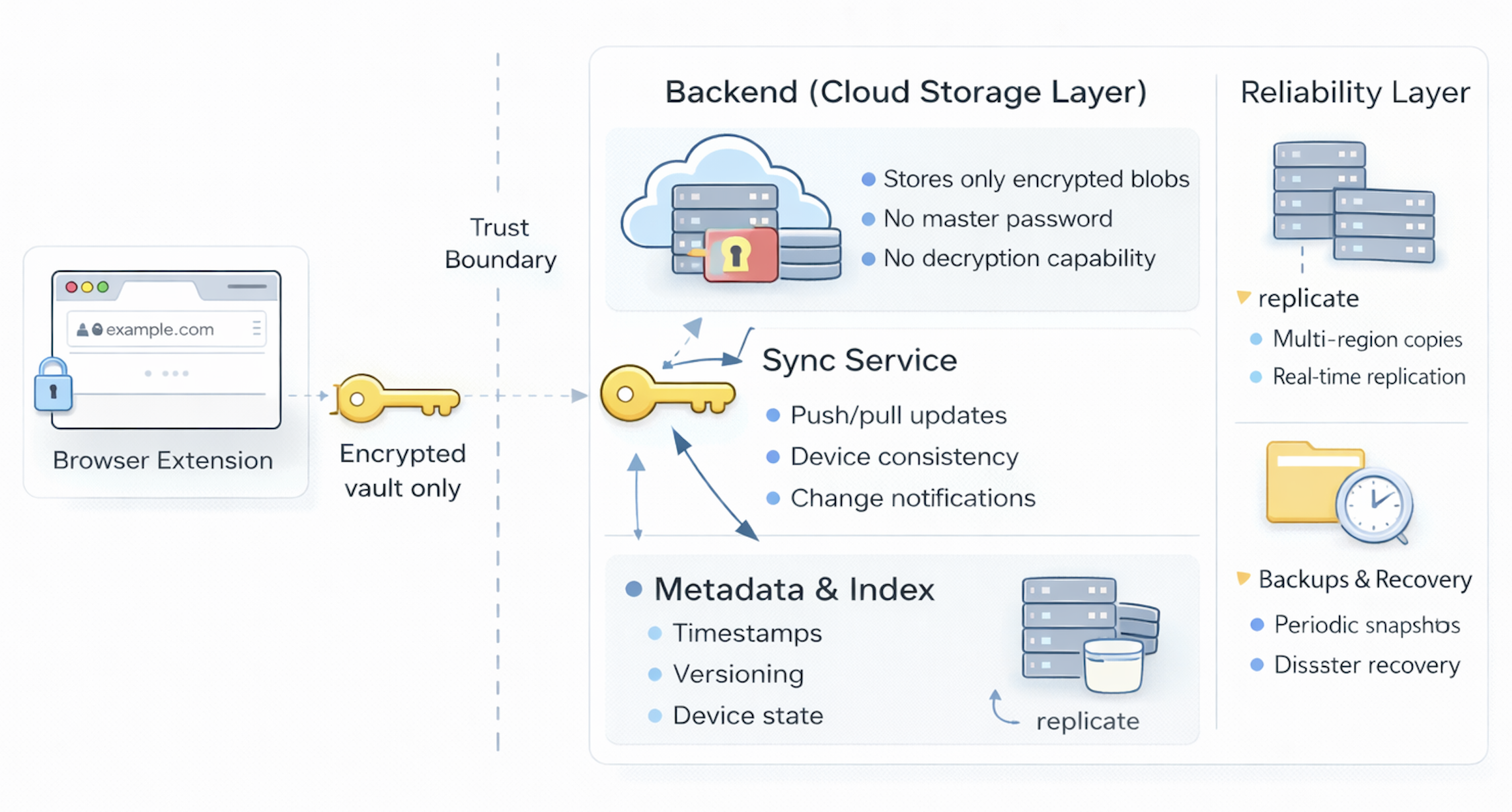
The backend is the storage and synchronization layer. It does not generate passwords, see plaintext secrets, or perform decryption. Its primary roles are to reliably store encrypted data, synchronize changes across devices, and ensure vault availability. In a well-designed system, the backend is powerful in terms of reliability and scale but deliberately limited in terms of trust: the client owns secrets, the server owns availability.
Account isolation and data boundaries
Every user has a logically separate store of encrypted vault data. The backend organizes this so that one person’s vault is never mixed with another’s, even when the underlying storage infrastructure is shared. Each user has a unique identifier, all encrypted entries are associated with that identifier, and access controls ensure only authenticated sessions for that user can read or write their data. This separation happens before decryption is ever considered, because the backend cannot decrypt vault contents in the first place.
What the backend actually stores
Because all encryption happens on the client, the backend’s view is intentionally narrow. It stores:
- Encrypted vault entries (opaque ciphertext blobs)
- Entry metadata: timestamps for creation and last update, internal identifiers
- Device and session records for synchronization management
- A hash or derived value of the authentication key, used to validate login without knowing the encryption key
It does not store:
- Plaintext passwords or usernames
- The master password
- The encryption key or any key material
From a security standpoint, this design dramatically limits the impact of a server breach. However, metadata is worth considering separately. Even in a zero-knowledge system, the server sees structural information: how many entries exist, when they were created or updated, and how frequently the vault is accessed. URL or domain names, if stored unencrypted as part of the entry metadata for sync efficiency, would also be visible. Most production vaults encrypt the entire entry including domain names, accepting slightly slower search in exchange for complete metadata protection. Some vaults store a cryptographic hash of the domain for indexing while keeping the plaintext domain encrypted, enabling efficient lookup without leaking the specific site.
Sync across devices
The primary reason users depend on a cloud backend is vault consistency across multiple devices. The typical sync flow:
- A change occurs on one device: a new credential is created or an existing one is updated.
- The extension encrypts the updated entry locally with the derived encryption key.
- The encrypted entry is sent to the backend with a version identifier or timestamp.
- The backend stores the update and marks it as the current version.
- Other enrolled devices receive a push notification or detect the change on their next sync poll.
- Those devices download the encrypted update and decrypt it locally.
At no point does the server need to understand vault contents to perform synchronization. It moves encrypted data between clients and tracks version state.
Versioning and conflict resolution
When multiple devices are active simultaneously, conflicts can occur — for example, editing the same entry on two devices before either syncs. The backend maintains versioning to handle this:
- A timestamp or monotonically increasing version number per entry.
- A “last writer wins” policy: the entry with the more recent timestamp overwrites the other.
- Some implementations maintain a short version history to allow clients to detect and present conflicts to the user rather than silently discarding one side.
Availability, redundancy, and backups
Unlike a client that lives on a single device, the backend must be designed for high availability. Production vault backends use database replication across availability zones, periodic encrypted backups, and tested disaster recovery procedures. For users, this means the vault persists even if a device is destroyed, and cloud-side durability is independent of device health. A user who loses every device but knows their master password (and, in 1Password’s model, has their secret key from their Emergency Kit) can restore complete vault access on a new device.
Authentication to the backend
Even though the backend cannot read vault contents, it must verify identity to retrieve the correct encrypted vault. Authentication uses the authentication key derived via HKDF — a value the client proves knowledge of during login. The server stores only a hash or verification value derived from the authentication key. A separate session token is issued after successful authentication and used to authorize vault read/write operations during that session. This maintains two distinct trust boundaries: authentication proves identity to the backend, while encryption protects secrets from the backend.
Mobile and Native Clients
Browser extensions handle the majority of vault interactions for desktop users, but a significant portion of daily credential access happens on mobile devices. Native mobile vault clients — and desktop applications — follow the same fundamental zero-knowledge model but interact differently with device hardware and operating system security primitives.
OS keychain integration
On mobile and desktop platforms, the derived encryption key can be stored securely in the operating system’s keychain or credential store between vault unlock sessions, rather than requiring the user to enter the master password every time the app is foregrounded.
On iOS, the Keychain Services API stores the key with a specific data protection class. At the highest protection level (kSecAttrAccessibleWhenUnlockedThisDeviceOnly), the key is accessible only when the device is unlocked, encrypted with a key derived from both the device passcode and the device’s hardware UID burned into the Secure Enclave. The Secure Enclave is a dedicated coprocessor isolated from the main CPU; keys stored there cannot be extracted even if the main OS is compromised. Transferring the keychain item to another device (even through an iCloud backup) is blocked by the ThisDeviceOnly attribute.
On Android, the Android Keystore System provides hardware-backed key storage on devices with a Trusted Execution Environment (TEE) or StrongBox security chip. Keys generated in the Keystore are non-exportable: cryptographic operations happen inside the hardware boundary and key material never surfaces to the Android application layer.
Biometric unlock
Biometric unlock — Face ID, Touch ID, or fingerprint readers on Android — is the most common vault interaction on mobile. It is important to understand precisely what biometrics do and do not change about the security model.
When a user first unlocks the vault with their master password on a mobile device, the derived encryption key is stored in the OS keychain, protected by a biometric access control. On subsequent vault openings, the biometric authenticates the user to the OS keychain, which releases the stored encryption key to the vault application without re-deriving it from the master password.
Biometrics therefore gate access to a stored session key; they do not replace the master password as the root of trust. The master password is still required for full vault access on new devices, after OS reinstalls, and in recovery scenarios. The encryption key derivation from the master password — with all its KDF work factor protection — remains unchanged. If the biometric is bypassed, the attacker still faces the OS keychain’s hardware security boundary. Extracting the key from the Secure Enclave or Keystore hardware requires physical access to the chip and defeats the purpose of a software attack.
Passkey-based vault unlock
Newer vault implementations are moving toward passkey-based unlock, where a FIDO2 passkey registered to the vault account takes the place of the biometric-gated session key. The passkey authenticates the user to the vault service, which then delivers the encrypted vault (the encryption key itself is still derived from the master password and stored on the device). This model improves security in roaming scenarios: a passkey synced through iCloud Keychain or Google Password Manager can unlock the vault session on a new device without requiring the secret key or master password in that moment, while still maintaining a hardware-backed credential assertion. 1Password introduced passkey vault unlock in 2024, and Bitwarden followed in 2025.
Mobile auto-fill
On mobile, vault auto-fill integrates with the platform’s native credential management APIs rather than directly manipulating DOM elements as a browser extension would.
On iOS, the Password AutoFill framework (introduced iOS 12) allows vault apps to register as a credential provider. When a user taps into a login field in any app or browser, iOS presents a prompt from the registered vault app. The vault matches against stored entries using the app’s bundle ID (for native apps) or the associated web domain (from an apple-app-site-association file). The credential is passed to the form through the OS — the vault app never has direct DOM access to the requesting app.
On Android, the Credential Manager API (Android 14+, with backwards compatibility through Autofill Framework) allows vault apps to register as credential providers. Autofill hints (autofillHints attributes on form fields) and package signatures are used for app matching. As with iOS, credentials are passed through the OS framework, not through direct inter-app access.
Enterprise Vaults and Secrets Management
Consumer password vaults are designed for individual users managing personal credentials. Enterprise deployments add shared access, administrative policy enforcement, integration with centralized identity systems, and audit requirements. And at the machine credential layer — API keys, database passwords, TLS certificates — a category of tool purpose-built for non-human identities has emerged: the secrets manager.
Team and shared vaults
Enterprise vault products like 1Password Business and Bitwarden Teams allow multiple users to share credential collections while preserving per-user encryption and zero-knowledge guarantees. The mechanism is item-level symmetric key encryption with public-key sharing.
Each vault (or collection) has a vault key — a symmetric AES-256 key generated when the vault is created. Each item in the vault is encrypted with this vault key. To give a user access to the shared vault, the vault key is encrypted with that user’s public key and stored on the server. The user’s private key is stored encrypted in their personal vault (encrypted with their personal derived encryption key). When the user opens the shared vault, the flow is:
- The user unlocks their personal vault, which decrypts their private key.
- The private key decrypts the vault key for the shared collection.
- The vault key decrypts individual items.
This model allows any number of users to share a vault without the server ever holding the vault key in plaintext. Revoking a user’s access removes their encrypted copy of the vault key. If the vault needs re-keying after a revocation (to prevent the removed user from using a cached copy), items must be re-encrypted with a new vault key — an operation the client performs with the new key distributed to remaining authorized members.
IdP SSO integration
Enterprise vault accounts can be linked to the organization’s identity provider, enabling employees to authenticate to the vault using their corporate SSO credentials rather than a separate vault password. When SSO is enabled, the vault authenticates the user via a standard SAML or OIDC flow to the IdP. Successful IdP authentication grants a session token to the vault backend.
However, SSO authentication alone does not unlock the vault encryption — the vault still needs the encryption key, which is derived from the master password or secret key the server never holds. The typical implementation is a trusted device model: on a managed corporate device, the vault has previously stored the derived encryption key in the device keychain after initial master password unlock. Subsequent SSO-based logins retrieve the session key from the device keychain, authenticated by the device’s possession of the stored key and the SSO assertion. On a new or unmanaged device, the master password (and secret key, where applicable) is still required to bootstrap the device-local key store.
This integration also enables automatic deprovisioning: when an employee is offboarded in the IdP (through SCIM or HR-driven provisioning), their vault account session is invalidated. Their encryption key remains inaccessible without SSO authentication.
Admin policies and enforcement
Enterprise vault deployments enable organizational policies that individual users cannot override:
- Master password requirements: minimum length, complexity rules, prohibition of common passwords checked against a breach corpus.
- MFA enforcement: requiring a second factor to access the vault, separate from the master password, usually TOTP or a hardware security key.
- Vault access restrictions: limiting vault access to managed devices with MDM compliance verified.
- Sharing controls: restricting which employees can share credentials outside the organization.
- Password health reporting: identifying weak, reused, or breached passwords across the organization without exposing the passwords to the admin (typically done client-side with aggregate reports sent to the admin dashboard).
Breach monitoring and k-anonymity
Most modern vaults include breach monitoring: checking whether stored passwords have appeared in known data breaches, primarily via the HaveIBeenPwned (HIBP) database. The design challenge is performing this check without sending passwords or even complete password hashes to a third-party server. The solution is k-anonymity password checking.
The protocol: the vault client computes the SHA-1 hash of the stored password. It sends only the first 5 hex characters of that hash to the HIBP range API (GET /range/{prefix}). The API returns all hash suffixes in its database that begin with those 5 characters — typically hundreds of entries. The client checks whether the full SHA-1 hash appears in the returned list. If it does, the password has been seen in a breach and the user is alerted. At no point does the complete hash — let alone the plaintext — leave the client. The 5-character prefix matches thousands of different SHA-1 hashes, providing a meaningful anonymity set that prevents the API from identifying which specific password was checked. This design was developed by Troy Hunt (HIBP) and Cloudflare and is now implemented by most major vault clients, browser built-in password managers, and some identity providers.
In enterprise deployments, breach checking extends to the organization-wide credential corpus without the admin ever seeing individual passwords. Each client independently checks its stored credentials and contributes only a count of breached passwords to the admin view — never the passwords themselves. The admin sees organizational risk posture while the zero-knowledge encryption boundary remains intact.
Audit logs
Enterprise deployments maintain audit logs for compliance and incident investigation. Because of the zero-knowledge model, what gets logged is limited but still valuable:
- Authentication events: login, logout, failed attempts, MFA challenges.
- Access events: which user retrieved which item (by identifier), when.
- Administrative actions: user creation and removal, vault key rotation, policy changes.
- Sharing events: items shared, vaults accessed by new members.
What cannot be logged in a true zero-knowledge system is the content of what was retrieved — the plaintext username or password — because the server never decrypts entries. This is a design tradeoff: stronger privacy and security guarantees at the cost of reduced forensic visibility into what credential was actually used.
Secrets managers: vaults for machine credentials
A consumer or team password vault stores human-readable credentials for websites and apps. Secrets managers address a different but adjacent problem: managing credentials that services, containers, and CI/CD pipelines need to function — database passwords, API keys, TLS certificates, OAuth client secrets, encryption keys. These are non-human identity (NHI) credentials, and they require a different operational model.
Key secrets managers in the ecosystem:
HashiCorp Vault is the most full-featured open-source option. Its distinguishing capability is dynamic secrets: instead of storing a static database password, Vault generates a fresh, time-limited credential on demand when a service requests it, then revokes it when the lease expires. The service that compromised an hour-lived credential gets nothing after the lease ends. Vault supports many secrets engines (KV for static secrets, database for dynamic credentials, PKI for certificate issuance, Transit for encryption-as-a-service) and many authentication methods for services to identify themselves: AppRole, Kubernetes service account tokens, AWS IAM, cloud platform-managed identities. Audit logs capture every secret access with full context.
AWS Secrets Manager is a managed secrets service tightly integrated with AWS IAM. It supports automatic rotation for RDS, Redshift, and DocumentDB credentials through Lambda functions, and fine-grained IAM policies control which services can retrieve which secrets. Encryption is handled by AWS KMS.
1Password Secrets Automation bridges the consumer/enterprise vault and the secrets manager category: service accounts are issued scoped tokens that can retrieve specific vault items via API, enabling CI/CD pipelines and automation scripts to access credentials without embedding them in code or environment variables.
Doppler focuses on developer experience: secrets are organized by project and environment (development, staging, production) and synced in real time to cloud platforms, container registries, and CI/CD systems. Changes propagate without requiring pipeline restarts.
The architectural distinction between a password vault and a secrets manager is the client: password vaults are built for humans with GUIs and browser integrations; secrets managers are built for code with APIs, CLIs, and SDK libraries. The underlying security models — encryption at rest, access controls, audit logging — are similar in principle.
Account Recovery and Emergency Access
Zero-knowledge creates a fundamental tension with account recovery. The same property that prevents the provider from reading your vault — the encryption key never leaves your devices — prevents the provider from restoring your access if you lose the key. In a purely zero-knowledge consumer vault, losing the master password is equivalent to losing the vault permanently. This is an intentional design consequence. But it is also unacceptable for enterprise deployments, and too harsh even for most consumer use cases. Real vault implementations offer several recovery models, each with different tradeoffs.
The 1Password Emergency Kit model
1Password addresses recovery through the combination of the master password and the secret key, rather than through server-side key escrow. At account creation, the system generates an Emergency Kit — a printable PDF containing the account email, the Secret Key, the account sign-in address, and instructions. The user stores this in a secure physical location.
Recovery works as follows: any device that has previously been enrolled already has the secret key stored in its keychain. On a new device, the user supplies both the master password and the secret key (typed or scanned from the Emergency Kit). The full derived encryption key can then be recomputed, and the vault is accessible again. No server-side secret is involved in this recovery — only secrets the user controls physically or across their enrolled devices. If all enrolled devices are lost and the Emergency Kit is also lost, the vault is unrecoverable. This is a harsh but logically consistent consequence of the security model.
Emergency access contacts
Bitwarden offers an emergency access feature that allows users to designate trusted contacts who can request access to their vault in an emergency. The flow:
- The user designates a trusted contact (another Bitwarden account) and sets a waiting period (between 1 and 90 days).
- In an emergency, the contact requests access.
- The vault owner receives an email notification and has the full waiting period to deny the request.
- If the owner does not respond within the waiting period, the contact is granted read or takeover access.
The cryptographic mechanism uses public-key cryptography: when the emergency contact is designated, their public key is used to encrypt the designator’s vault key and store it for potential future use. The waiting period is the human control that prevents immediate unauthorized access if the vault owner is still reachable. This model allows recovery without breaking zero-knowledge, because the contact’s access to the vault key is established at designation time and only becomes usable after the wait period expires without denial.
Enterprise SSO and admin recovery
In enterprise vault deployments tied to an IdP via SSO, administrative recovery is possible at the IdP level without touching vault encryption directly. An IT administrator can reset the employee’s IdP credentials, issue a new SSO session, and allow the employee to enroll a new trusted device. On the new device, the master password is required to re-bootstrap the device-local encryption key. If the master password is also forgotten, most enterprise vaults support an account recovery key option: administrators hold an organization-level public key; when a user enrolls a new device, their vault key is also encrypted with the organization’s recovery key and stored. An administrator with the corresponding private key can then participate in recovery, re-encrypting the vault key for the employee’s new device.
This is a controlled exception to zero-knowledge: the organization chooses to hold an escrow key for operational continuity. The security implication is that the organization’s recovery key becomes a high-value target; if it is compromised, an attacker can participate in the recovery flow for any employee. Enterprise vault deployments with this capability should protect the recovery key with hardware security modules and require multi-party authorization for use.
The recovery tradeoff
Every recovery mechanism reintroduces some form of trust into a zero-knowledge system. Emergency Kit recovery trusts the user to protect a physical document. Emergency access contacts trust both the designated contact and the email notification channel. Enterprise SSO recovery trusts the IdP and the administrator. Organizational escrow recovery trusts whoever holds the escrow key and the authorization process. There is no recovery option that does not, by definition, create a path around the encryption. The goal is not to eliminate that tradeoff but to make it explicit, constrained, and auditable.
Threat Model of a Password Vault
A password vault is a powerful security tool, but it operates within a defined threat model. Understanding what it protects against, what it does not, and where new risks are emerging is as important as understanding how it works internally.
What a password vault protects against
Credential reuse. Without a vault, most users inevitably reuse passwords across accounts. A breach at one site yields working credentials for dozens of others. By generating and storing unique, random credentials for every account, a vault breaks this chain entirely. A breach of site A yields a credential that works only at site A.
Weak and predictable passwords. Human-chosen passwords cluster around patterns: dictionary words, names, dates, keyboard walks. A vault’s generator produces passwords from a CSPRNG with no such patterns. Even short generated passwords (20 characters) have more entropy than most human-chosen passwords twice as long.
Phishing via origin binding. The vault’s URL-based credential matching means it will not auto-fill credentials on lookalike phishing domains. A user who lands on a credential-harvesting site does not see the auto-fill prompt, providing both a defensive control and a warning signal.
Backend breaches. A server-side compromise yields only encrypted ciphertext. Without the client-derived encryption key — which never touched the server — the ciphertext is computationally unusable. In 2022, LastPass suffered a major breach where encrypted vault data was exfiltrated. The security of affected vaults depended on the strength of users’ master passwords and the KDF parameters in use at the time — highlighting both the protection the model offers and the criticality of strong master passwords and modern KDF parameters.
What a password vault does not protect against
Malware and device compromise. If a device is infected with a keylogger, spyware, or remote access trojan, an attacker can capture the master password at unlock time, observe credentials as they are decrypted in memory, or intercept auto-fill events. The vault cannot defend against a threat already operating inside the trusted boundary. Device security — OS patches, endpoint detection, disk encryption — is a prerequisite for vault security.
Social engineering and direct coercion. A user who is deceived into entering their master password into a fake vault login page, or is directly compelled to hand it over, bypasses all technical controls. Vault security assumes the master password is kept confidential by the user.
Targeted master password phishing. Attackers who specifically target high-value vault users (security professionals, executives, IT administrators with broad credential access) have strong incentives to craft targeted phishing campaigns for vault credentials specifically. A password vault concentrates access to many accounts into a single authentication event, which makes the master password a high-value target. The risk of losing one password that unlocks everything is structurally different from the distributed risk of separate passwords per site.
Weak master passwords with weak KDF parameters. The KDF work factor is the only defense against offline brute-force if encrypted vault data is stolen. If the master password is weak (short, dictionary-based, personally identifiable) and the KDF iteration count is low (as was the case with some LastPass accounts using pre-2018 defaults), offline cracking may succeed. Modern vaults with Argon2id and recommended memory cost parameters make weak-master-password cracking significantly more expensive, but not impossible if the password itself is trivially guessable.
Browser extension supply chain attacks. Browser extensions update automatically through browser extension stores. A malicious update to a vault extension — whether through a compromised developer account, a supply chain attack on a build dependency, or a malicious approval from the extension store review process — could exfiltrate vault data at unlock time. The extension runs in the browser with elevated permissions, and users rarely notice or verify extension updates. This risk applies to any browser extension with sensitive data access, but is particularly high for vault extensions given the concentration of credentials they hold.
Plaintext vault export. Virtually all vaults offer an export function — CSV, JSON, or encrypted backup — intended for migration between vault providers or emergency recovery. The CSV and JSON formats produce an unencrypted file containing every credential in plaintext. This file bypasses the entire zero-knowledge architecture: it exists on disk unprotected, is included by default in most cloud storage backups, may appear in browser download history, and persists after the session ends. A user who exports to migrate between vault providers and does not immediately securely delete the export file has created a permanent, unencrypted copy of their entire credential corpus. The vault cannot prevent this misuse — the export is a legitimately requested client-side operation. Treat any plaintext vault export with the same handling discipline as an unencrypted private key: transfer only over encrypted channels, use immediately, then delete securely.
AI-era threats
AI-assisted credential stuffing. Traditional credential stuffing uses exact username/password pairs from breach dumps. Modern AI-assisted variants use language models to generate contextual password variations from partial information — a name, a leaked password from one site, and information about a company can produce a set of likely password variations to test against a vault login endpoint. This raises the quality of brute-force attacks against authentication endpoints and increases pressure on rate-limiting and anomaly detection at the vault service level.
AI-enhanced phishing targeting vault credentials. Phishing campaigns targeting vault master passwords are now personalized at scale using LLMs. An attacker with a target’s name, company, and some context from public sources can generate a convincing, personalized email claiming to be from the vault provider, requesting re-authentication or a security verification. Unlike mass-blast phishing, these campaigns are indistinguishable from legitimate communications without careful inspection of headers and links. The defense remains the same: verify URLs before entering master passwords, enable phishing-resistant MFA where the vault provider supports it, and treat any vault re-authentication prompt received via email as suspicious.
AI agents accessing vaults. As AI agents are deployed for automation — managing inboxes, scheduling, executing workflows — they increasingly need access to credentials. Granting an AI agent the user’s full vault access for convenience creates significant risk: the agent becomes a target for prompt injection attacks that manipulate it into exfiltrating credentials or using them in unauthorized ways. The correct model is to issue the agent a scoped token with access to only the specific credentials it needs, for the duration of its task, through a secrets manager or vault service account. Full vault access should never be delegated to an autonomous agent.
How the threat model maps to the architecture
The threat model directly explains the architecture’s design choices:
- The browser extension is the trusted security core because all plaintext handling and cryptographic operations must happen in an environment the user controls.
- The backend is deliberately untrusted with respect to secrets, so a server-side breach is a data exfiltration event with limited immediate impact, not an immediate credential compromise.
- The zero-knowledge encryption boundary between client and server is the architectural guarantee that makes this threat model coherent. Every significant security property the vault provides depends on the integrity of that boundary.
The Design Decisions Behind Zero-Knowledge
When you follow the cryptographic chain from master password to stored ciphertext — through the KDF, HKDF key separation, and AES-256-GCM authenticated encryption — a consistent principle emerges: every design decision is oriented around protecting the client from the server, not the other way around. The vault is designed to assume the server will eventually be compromised and to ensure that compromise yields nothing useful. That is an unusual inversion of the typical client-server trust model, and it shapes every architectural choice.
It also creates real operational tradeoffs. Zero-knowledge means no server-side recovery, no provider support for forgotten master passwords, and limited forensic visibility into what was accessed. Enterprise deployments that need recovery capabilities must deliberately introduce escrow mechanisms and accept the additional attack surface they create. There is no way to have both the unconditional confidentiality of a zero-knowledge vault and a recovery path that requires no prior trust relationship. Understanding this is what separates informed use of a vault from treating it as a black box.
The architecture of a password vault — client as security engine, server as trusted-only-for-availability, encryption boundary in between — applies well beyond password management. Any system that stores secrets on behalf of users faces the same fundamental question: where does trust live, and what happens when a component of that trust chain is compromised? Password vaults answer that question in a specific, coherent, and cryptographically defensible way. The answer they give is worth understanding, both for what it achieves and for what it costs.